Skip to content

The product

Every screen,
doing a day's work.

Live timetables, QR attendance, structured sign-offs and cohort notices — each built for the clinical day, and all writing to the same placement record.

Runs in the browser on any device. Mobile apps In development

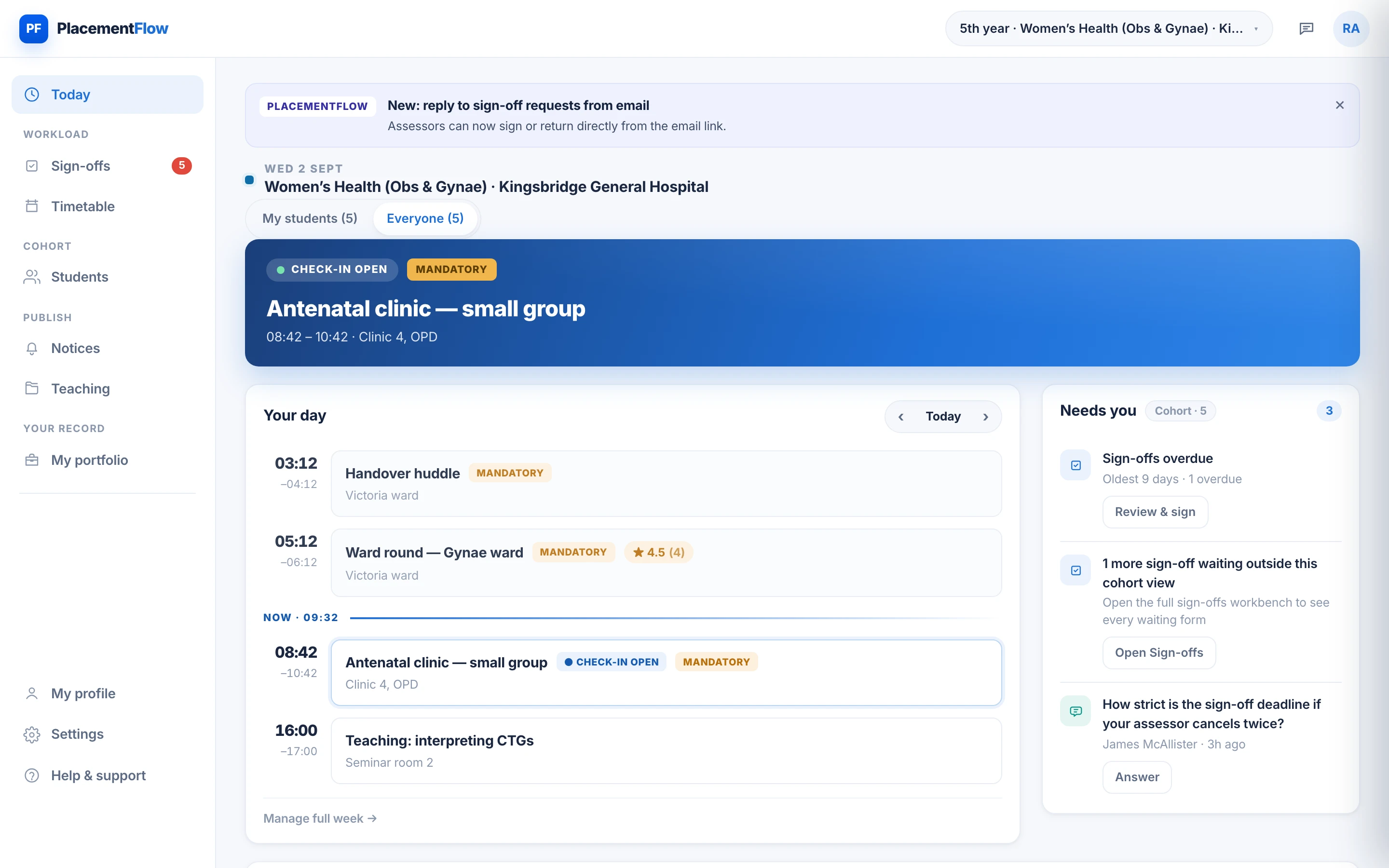
The clinician's Today screen: the current antenatal clinic, the day's session sequence, a five-student cohort and the items waiting for review.

01 · Timetables and placement information

The whole week, kept current.

Clinics, ward rounds, theatre and teaching each carry their own colour; mandatory sessions are flagged amber. Publish the week once and every student sees the same, current version — with the site guidance they need to turn up in the right place.

  • Calendar and list views, on any screen size.
  • Assign sessions to the whole cohort or a named group.
  • Attendance windows and QR settings set per session.
  • A change reaches everyone it affects — no re-sent PDFs.
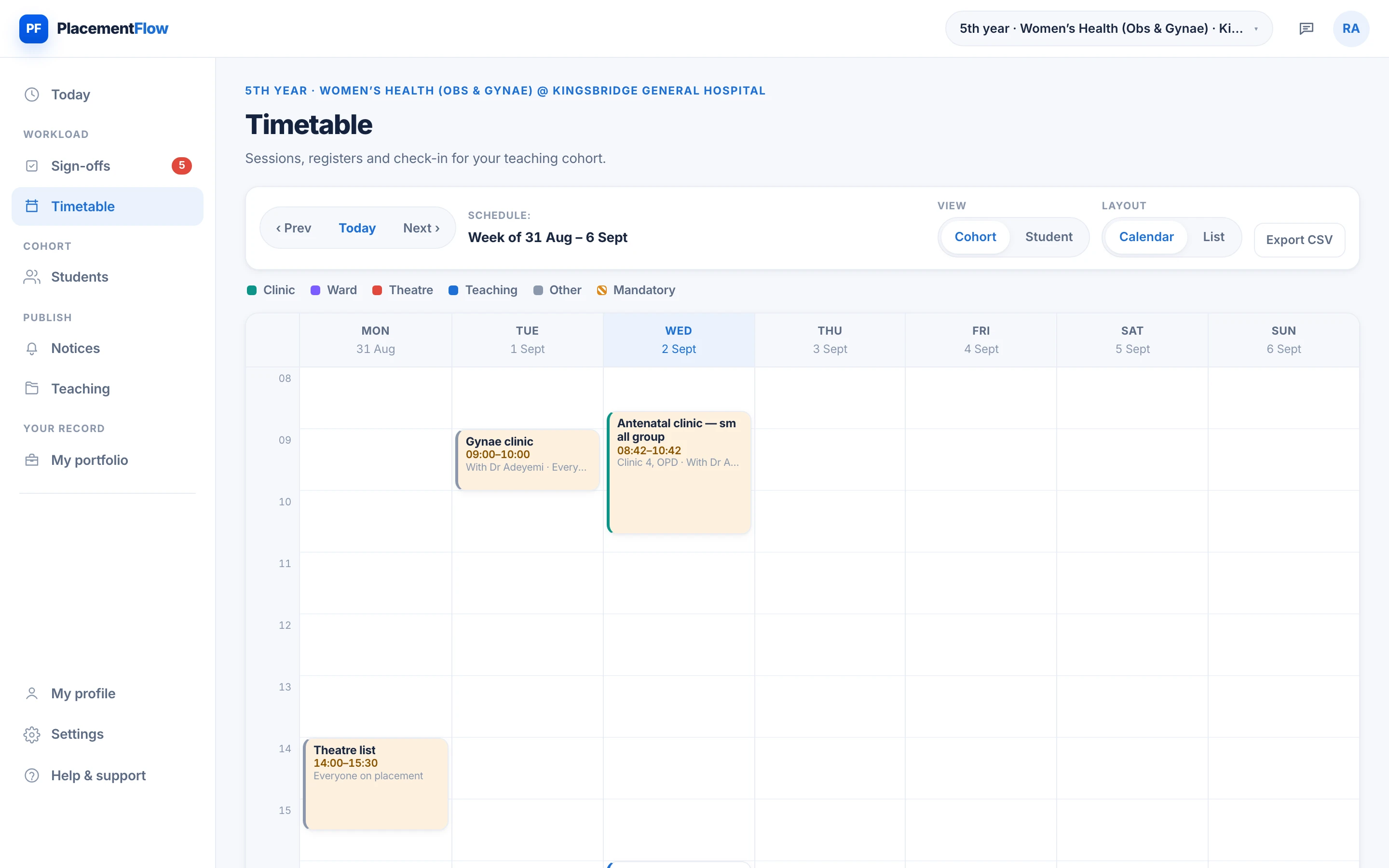
The cohort timetable: a week of colour-coded clinics, ward rounds, theatre and teaching sessions, with CSV export.
1Tap a number to see what that part of the screen does.

02 · Attendance and QR check-in

Registers that take themselves.

A rotating QR code on the clinician's screen; students scan in from their phones; the live register fills before the first patient. Anyone who could not scan is marked present, excused or absent with one tap.

  • Rotating codes stop a screenshot being shared around.
  • Check-in windows open and close around the session.
  • Built for the ward round, not just the seminar room.
  • Recorded at source, as it happens — nothing to reconstruct later.
Close on the clinician's Today screen: the current antenatal clinic has check-in open, with the day's earlier and later sessions shown beneath it.
1Tap a number to see what that part of the screen does.

03 · Sign-offs and written feedback

Assessment, not paperwork.

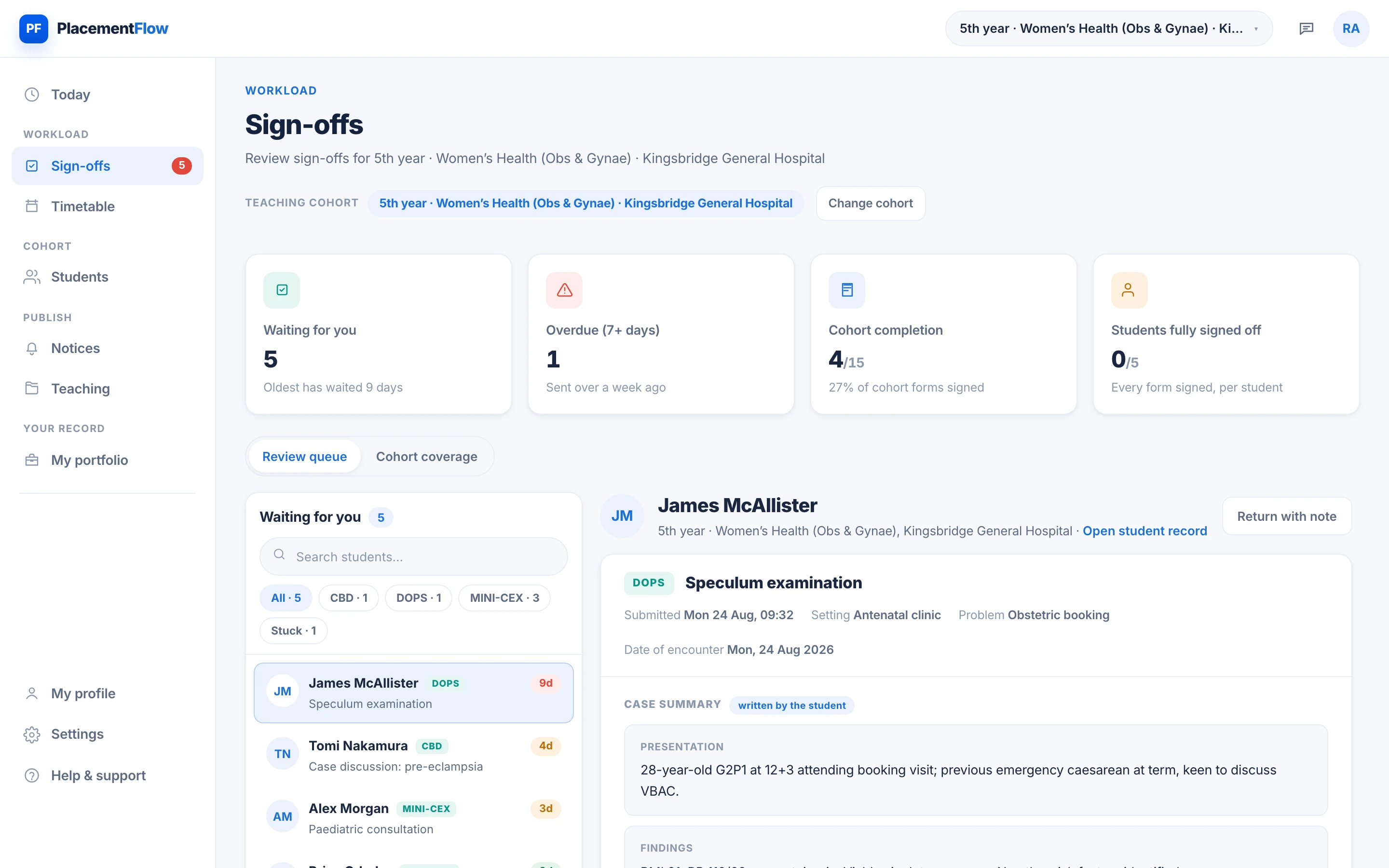
Mini-CEX, DOPS and case discussions arrive in a review queue with the student's write-up attached. The assessor rates each domain, writes what to work on, and signs — and the feedback is in the student's record the moment it is signed.

  • Structured domain ratings, not a free-text box.
  • Return a form with a note instead of signing blind.
  • Every signature records who and when.
  • Cohort coverage shows who is stuck before it is urgent.
The sign-offs workspace: a queue of requests waiting for the assessor, with a submitted DOPS open beside it showing the student's write-up.
1Tap a number to see what that part of the screen does.

04 · Notices and cohort communication

Say it once. Everyone sees it.

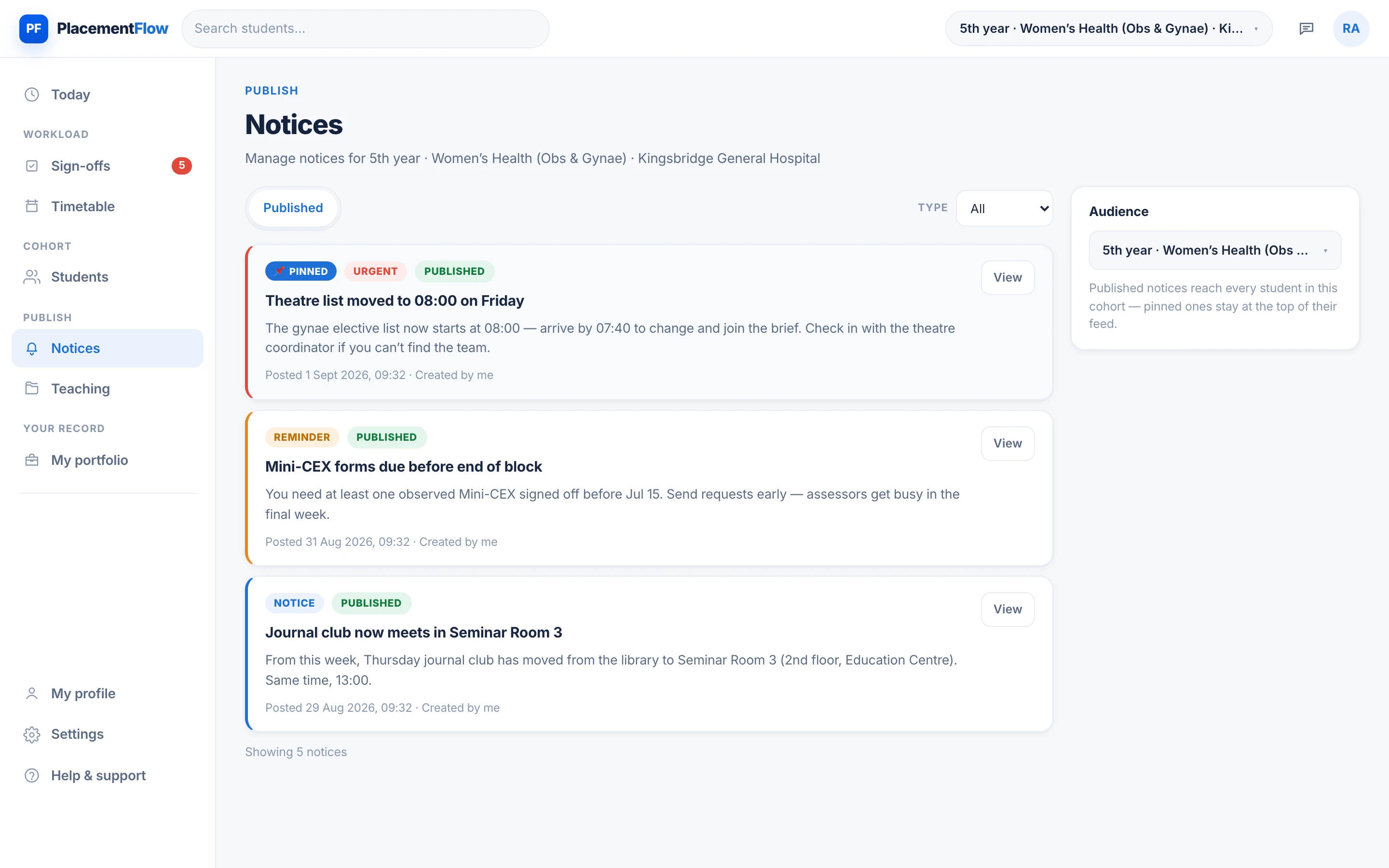
A theatre list moves, a clinic is cancelled, a room changes: publish one notice to the affected cohort and it lands at the top of every student's feed. Drafts and scheduled publishing are built in, so Friday's reminder can be written on Tuesday.

  • Urgent, reminder and notice types — visually distinct.
  • Pinned notices stay at the top of every student feed.
  • Drafts and scheduling built in.
  • Scoped to the block, so nobody reads a message that is not theirs.
The notices screen: a pinned timetable-change notice at the top of the cohort's feed, with earlier reminders beneath it.
1Tap a number to see what that part of the screen does.

One connected record

Entered once. True everywhere.

The same session powers the student's check-in, the clinician's register and the placement team's oversight. Every scan, signature and note is timestamped and attributable, and lands in one record per student — never re-typed, never reconstructed from email.

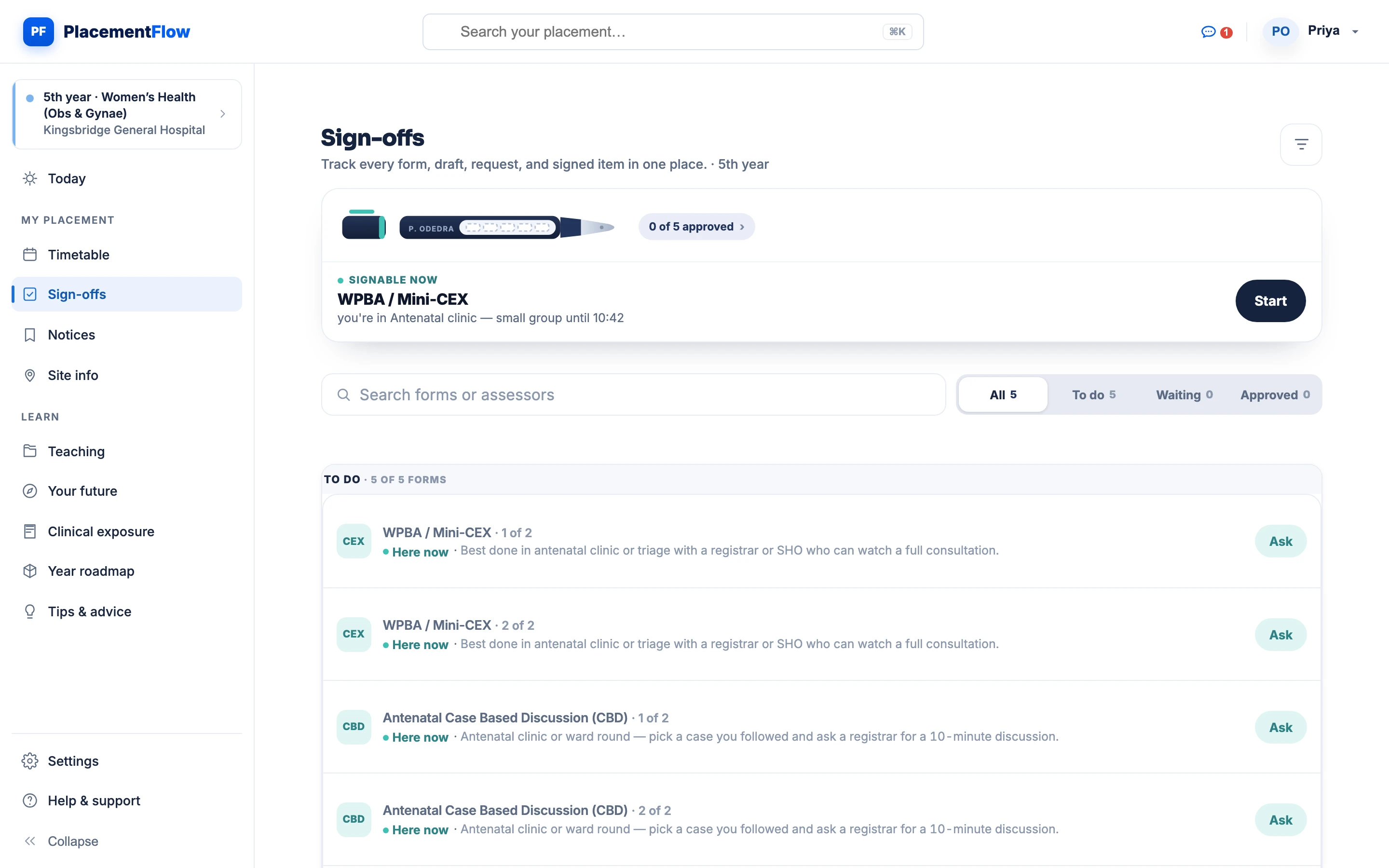
The student's sign-offs page: year progress, the next signable assessment and the remaining required forms.
StudentTheir own record: the week, check-ins, requests and returned feedback. Never another student's.
The clinician's Today screen with the live register and review queue.
ClinicianTheir cohort: today's sessions, the live register and the review queue, named students first.
The published cohort timetable the placement team maintains.
Placement teamCoverage, not content they do not need: attendance, timetable changes and sign-off progress across the cohort.
Who it's for — the same day, three working views

A week on placement

End to end, without a chasing email.

One block, one week, and the four capabilities doing their jobs in the order the week actually needs them.

  1. Ward round, 08:00. Students scan the QR at the door — the register fills itself before the first patient.
  2. Antenatal clinic. A Mini-CEX is requested at the bedside and lands in the assessor's review queue.
  3. Teaching published. CTG teaching goes on the timetable — mandatory, flagged amber on every student's week.
  4. Theatre list moves. One urgent notice reaches the whole cohort — nobody waits outside the wrong theatre.
  5. Week signed off. Attendance recorded, feedback in every record, and the placement team never sent a chasing email.

See it against your own programme.

Tell us how your school runs placements today, and we'll explore a pilot configured around your curriculum, sites and assessment rules.

Every request is reviewed by a person.