Skip to content

For medical students

Your placement.
One continuous record.

See the week, check in, request sign-offs and receive feedback — with the teaching and guidance relevant to your school and year.

Runs in the browser on any phone or laptop. Mobile apps In development

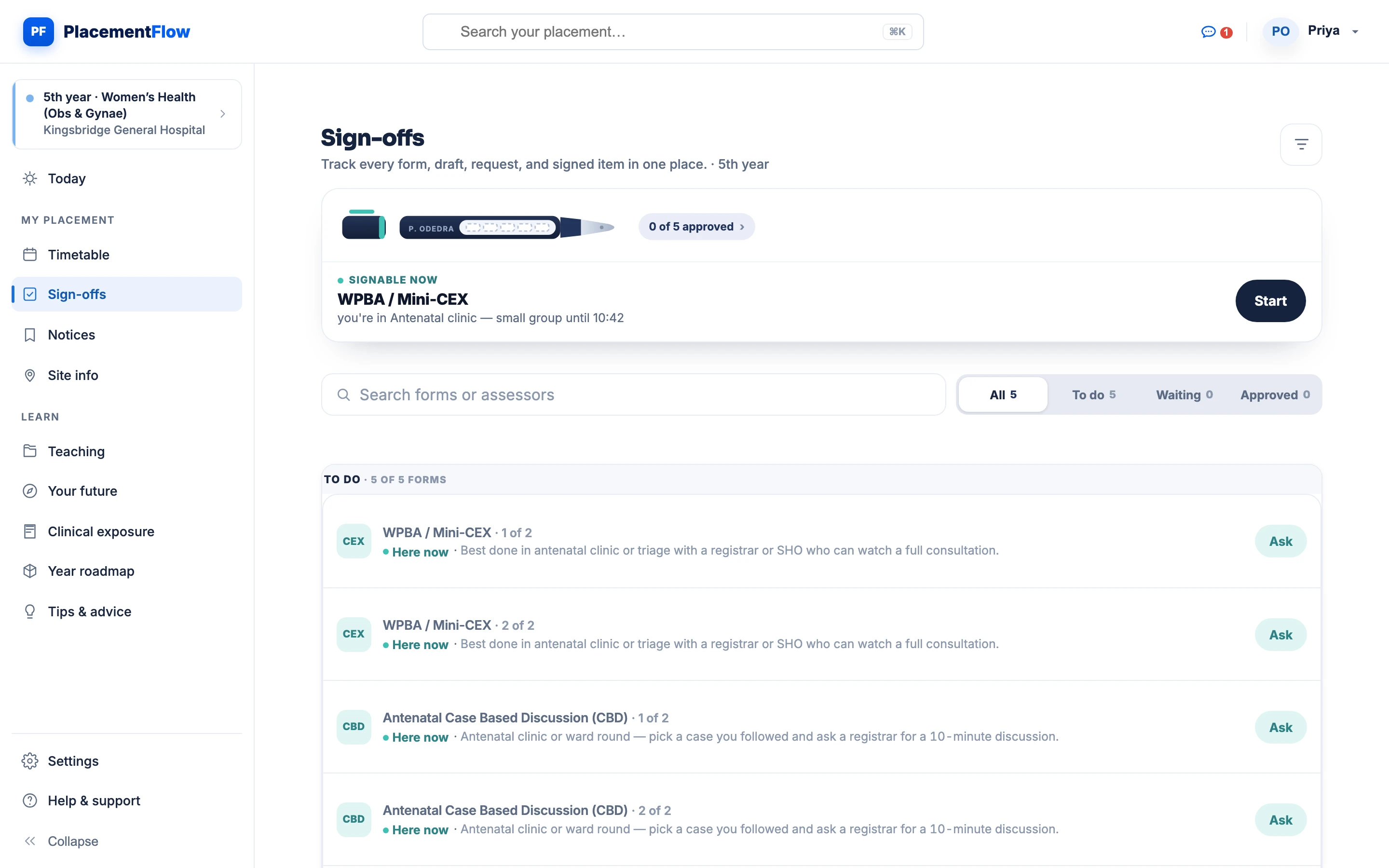
The student's sign-offs page on desktop: progress for the year at 0 of 5 forms approved, a Mini-CEX that is signable at the next session, and the to-do list of required forms with a hint on where each is best done.

Through your university

Everything your placement runs on, in one place.

When your medical school joins, the placement record switches on: the week, your check-ins, sign-offs, notices and the teaching your placement publishes. Your school configures it. You just use it.

Timetable and site guidance

The week, before you're on it.

A colour-coded week — clinics, ward rounds, theatre and teaching — that updates itself when the placement changes. Mandatory sessions are flagged amber. Site information for the block sits alongside it, so you know where to be and when.

  • Calendar and list views, on any screen size.
  • Mandatory sessions flagged, so nothing is missed.
  • A change reaches you the moment it's published — no re-sent PDFs.
  • Site information for the current block, next to the week.
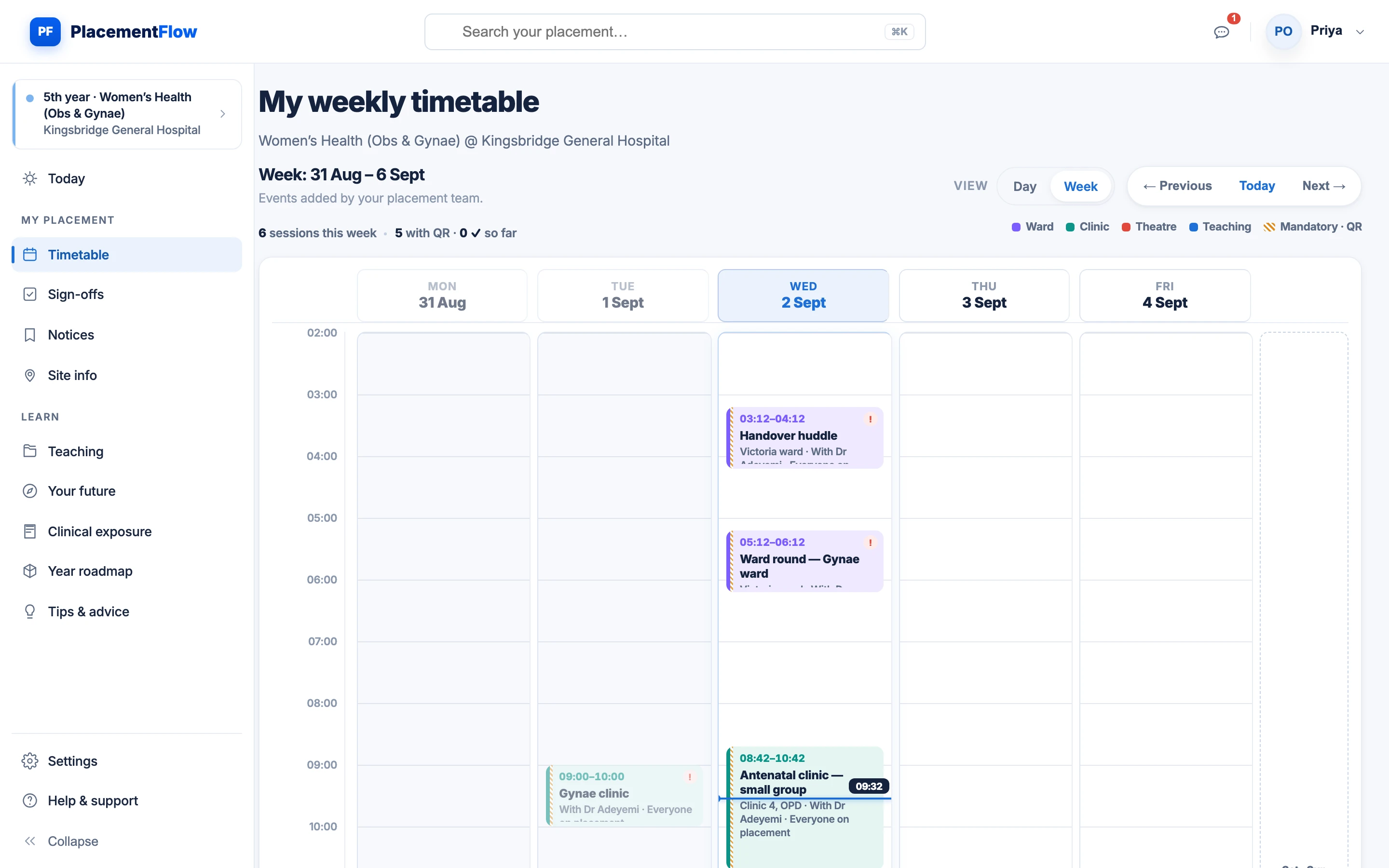
The student's weekly timetable: six colour-coded ward, clinic, theatre and teaching sessions across Monday to Friday, a live marker on the current time, and a key for mandatory QR sessions.
The student's own view: the sessions the placement team published, with a live marker on the current time.

Sign-offs and feedback

Request at the bedside, from your phone.

Mini-CEX, DOPS and case-based discussions: pick the form, write your case summary — anonymised, never a patient identifier — and name an assessor on your placement. It becomes official only when that assessor signs from their own verified account.

  • Ask from the ward — the request lands in the assessor's review queue.
  • Assessor ratings and written feedback come straight back to you.
  • Returned with a note? You see exactly what to change.
  • Every signature records who and when.
The student's to-do list of sign-offs — two Mini-CEX and two case-based discussions, each with a hint on where it is best done — beneath a Mini-CEX prompt that is signable at the next session.

Placement notices

When the list moves, you know first.

A theatre list moves, a clinic is cancelled, a room changes: one notice from your placement lands at the top of your feed. Urgent notices, reminders and plain notices look different, and pinned ones stay at the top until they're done with.

  • Scoped to your block — you never read a message meant for another cohort.
  • Pinned notices stay at the top of your feed.
  • Urgent, reminder and notice types, visually distinct.
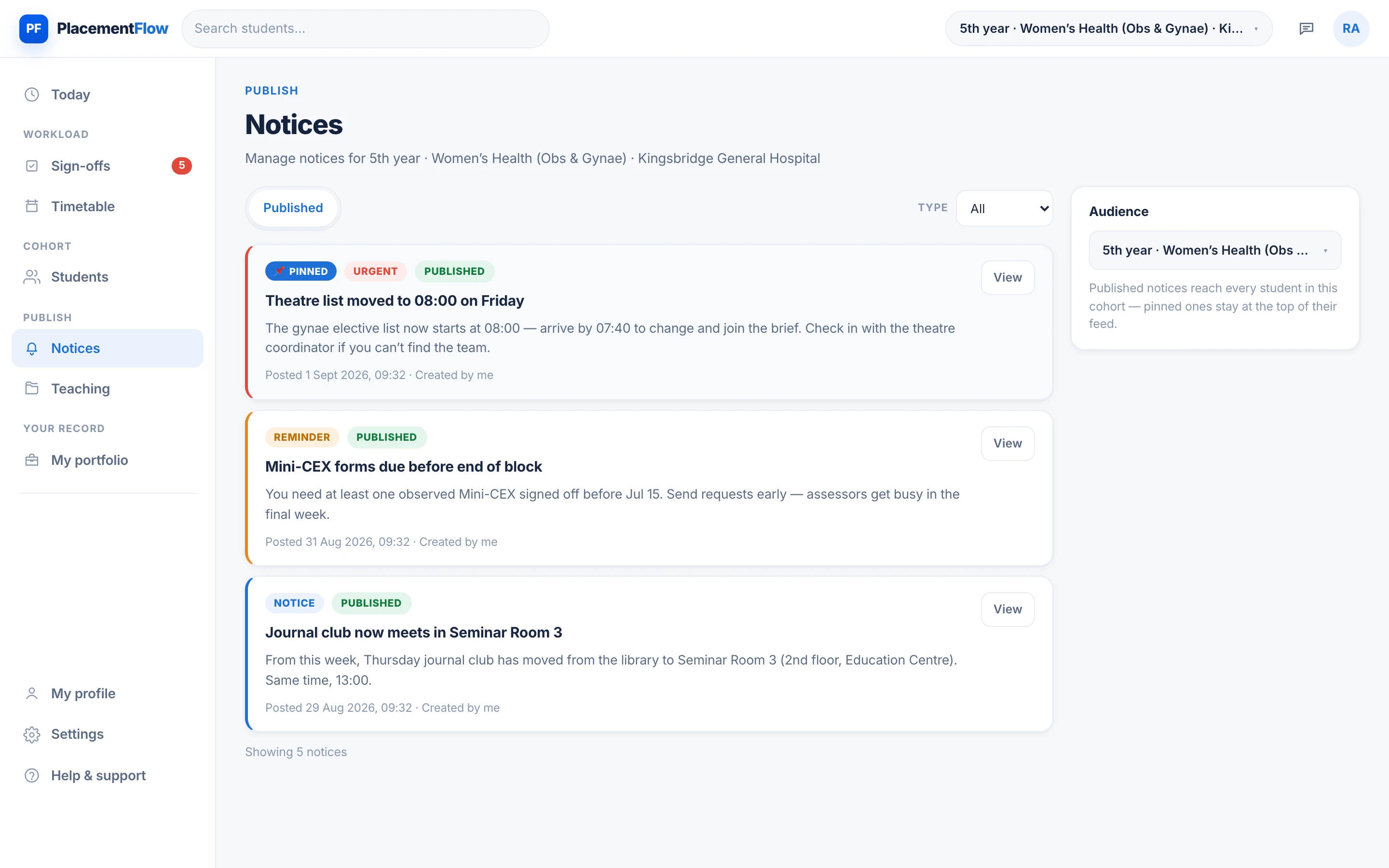
The notices for one cohort: a pinned urgent notice that Friday's theatre list has moved to 08:00, a reminder that Mini-CEX forms are due before the end of the block, and a room change for journal club.
Captured from the publishing side. Your feed shows the same notices, pinned ones first.
Attendance and check-in

A rotating QR code on the clinician's screen. You scan it from your phone during the session's check-in window and you're marked present at source — in seconds, with nothing to reconstruct later.

  • Rotating codes, so a screenshot can't be passed around.
  • If a scan fails, use Report an issue on that session — not a second check-in.
  • Every check-in goes straight into your record.
How the register works
Teaching published by the placement

Notes, links and session material published by your placement — pitched at your year's exams and OSCEs. It sits in your Teaching area, published by the clinicians who teach on your rotation.

  • Notes, links and session material in one place.
  • Pitched at your year's exams and OSCEs.
  • Published for your placement; visible with school access.
Distinct from the studios below, which PlacementFlow publishes for everyone.
Opportunities School option

Audits, case reports and QI projects posted by clinicians on your placement — a plain list you can read in a minute, to build your CV while you're there. Listings come from placement teams, clinicians or the PlacementFlow team.

  • No algorithm, no scores.
  • Pipeline states are your own tracking, self-declared — not verified evidence.
An opt-in feature your school switches on.

All of this switches on when your university joins. Your placement, its sessions and the sign-off forms come from your school's allocation, not from anything you set up yourself — so there is nothing to configure, and nothing to chase.

Your placement record

A portfolio that writes itself.

Every scan-in, signed Mini-CEX and piece of written feedback lands in one timestamped record. By the end of the rotation you have evidence — not a folder of paper forms to chase.

  • Your own record — never another student's.
  • Completed sign-offs are official and use the verified-assessor workflow.
  • Skills and conditions progress is self-declared, to help you set goals — it isn't an assessor sign-off.
  • Timestamped and attributable — who, what and when, on every entry.
The top of the student's sign-offs page: progress for the year at 0 of 5 forms approved, a Mini-CEX that can be requested at the next session, and the search and status tabs above the to-do list.

Learn with PlacementFlow

Teaching and guidance, opened in stages.

Studios open in stages, after clinical review. A free account shows what's available for you today, and each studio appears as it is released.

In development being built; not yet available to students Limited pilot open to a small pilot group while it is reviewed University published by your university, for its own students Included available in every account today

Studios

Plan what comes next

Your school isn't connected yet?

PlacementFlow runs through your medical school. Tell us where you study and we'll speak with your placement team about getting you connected.

Every request is reviewed by a person.