Skip to content

Who it's for

One system.
Three very different days.

The same session powers the student's check-in, the clinician's register and the placement team's oversight. Enter it once; it's true everywhere.

Real PlacementFlow screens, shown with an illustrative demo cohort.

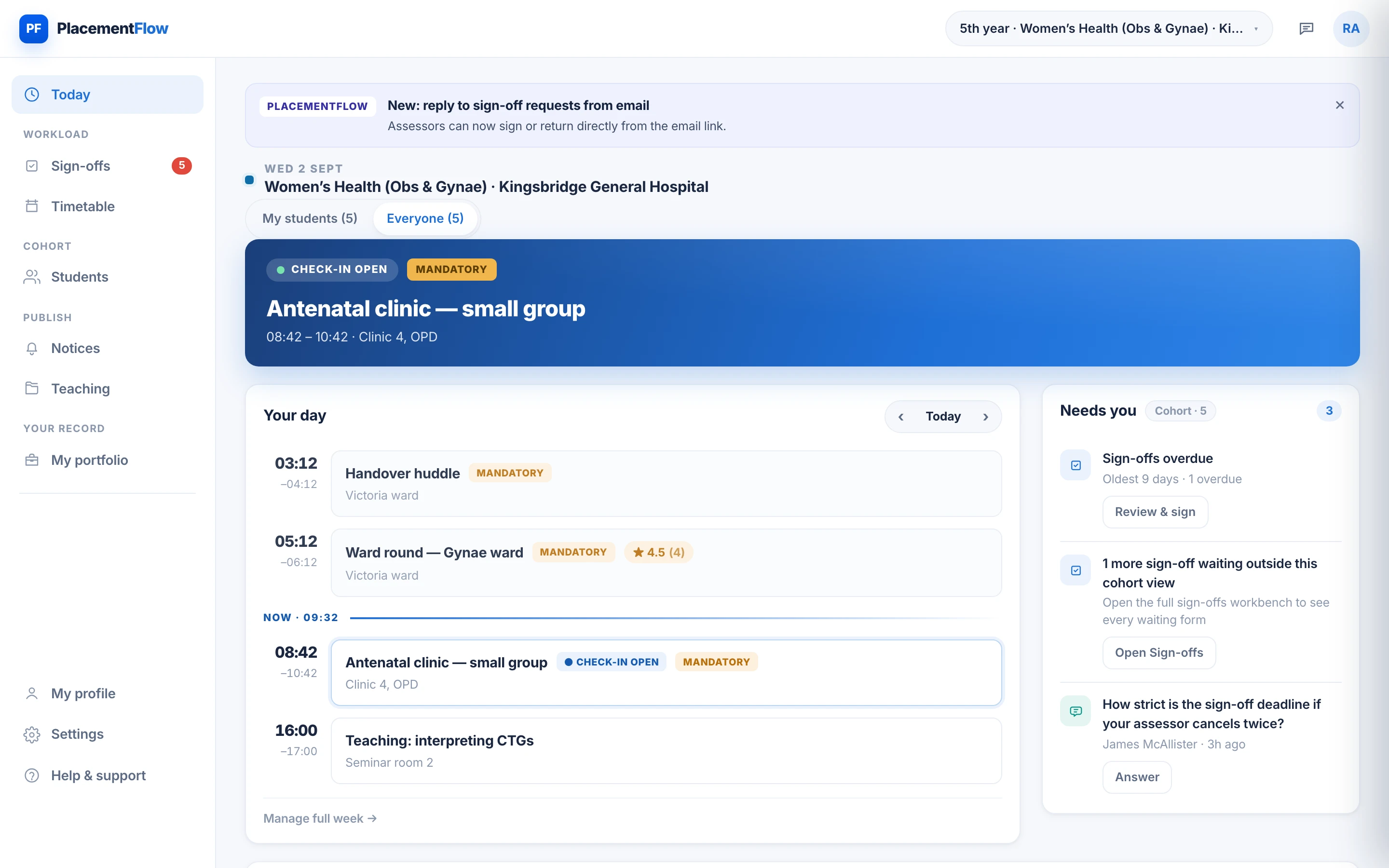
The clinician's Today screen: the current antenatal clinic with check-in open, a five-student cohort, the day's sessions and the Needs you panel.

01 · Student

Scan in, see the week, get signed off.

With guidance pitched at your school's exams, and a record that builds itself from the day you actually had. Everything a student does on placement — check in, request, receive — writes to their own record, and never to another student's.

  • Check in to sessions with a scan, in seconds.
  • See the week — a colour-coded timetable that updates itself.
  • Get signed off — requests and written feedback in one logbook.
  • Your own record — timetable, check-ins, requests and feedback. Never another student's.
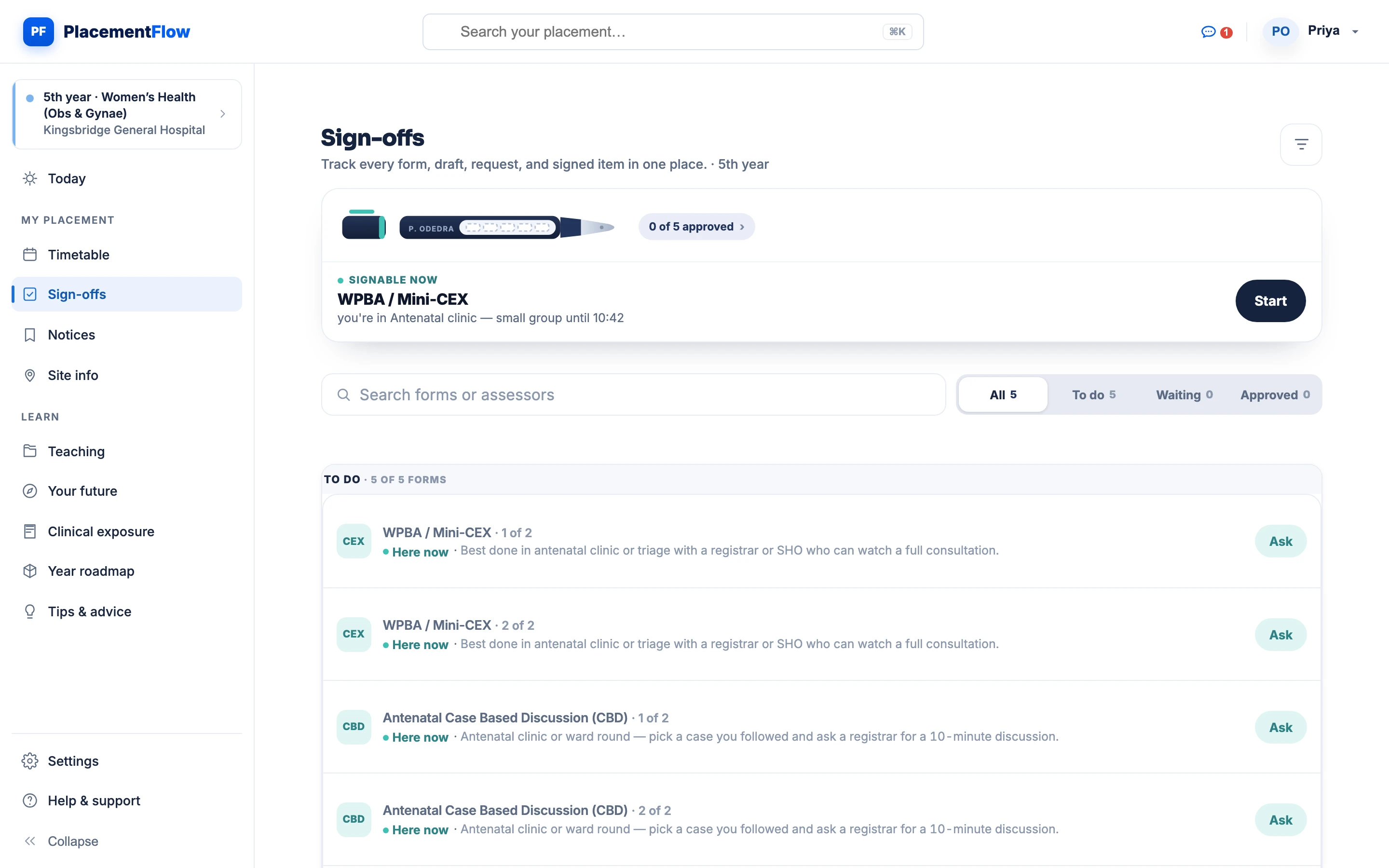
The student's sign-offs page on desktop: progress for the year at 0 of 5 forms approved, a Mini-CEX that is signable at the next session, and the to-do list of required forms with a hint on where each is best done.

A Wednesday, as the student sees it.

  1. Checks in. Scans the rotating QR at the theatre doors — marked present at source before the list starts.
  2. Requests a Mini-CEX. From their phone, in antenatal clinic; it lands in the assessor's review queue with the write-up attached.
  3. Sees the theatre-list notice. Friday's list has moved to 08:00 — pinned at the top of their feed, no forwarded email.
  4. CTG teaching. Mandatory, flagged amber on the week; scanned in like any other session.
  5. Feedback returned. Domain ratings and what to work on, signed and already in their record.
02 · Clinician

A register that fills itself.

And a review queue instead of a paper chase. Today's sessions, the live register and the requests waiting for you — your named students first, then the whole cohort — on one screen you can read between patients.

  • Run the session — live registers with one-tap overrides.
  • Review and sign — real assessment forms: ratings, strengths, development.
  • Keep perspective — your students, or the whole cohort, at a glance.
  • Nothing to reconstruct — attendance is recorded at source, as it happens.
The clinician's day on the Today screen: the current antenatal clinic with check-in open, earlier sessions, later CTG teaching and outstanding work in the Needs you panel.

The same Wednesday, from the clinic.

  1. QR on screen. The theatre-list register fills as students scan in; one tap marks anyone who couldn't.
  2. 3 of 5 checked in. The antenatal clinic's live register, before the first patient.
  3. Signs the DOPS. Rates each domain, writes what to work on and adds a note — done at the desk between patients.
  4. Review queue clear. Nothing overdue, nothing waiting — until the next request arrives.

03 · Placement team

Oversight without the chasing.

The record writes itself at the point of care, so the placement team reads coverage instead of chasing it: attendance across sites, timetable changes and sign-off progress for every student — and not the content they don't need.

  • Attendance at source — recorded as it happens, not reconstructed later.
  • Publish once — a notice or timetable change reaches the whole cohort.
  • Coverage in one view — sign-off progress for every student.
  • Configured with you — years, sites, rotations and the sign-offs your school requires.
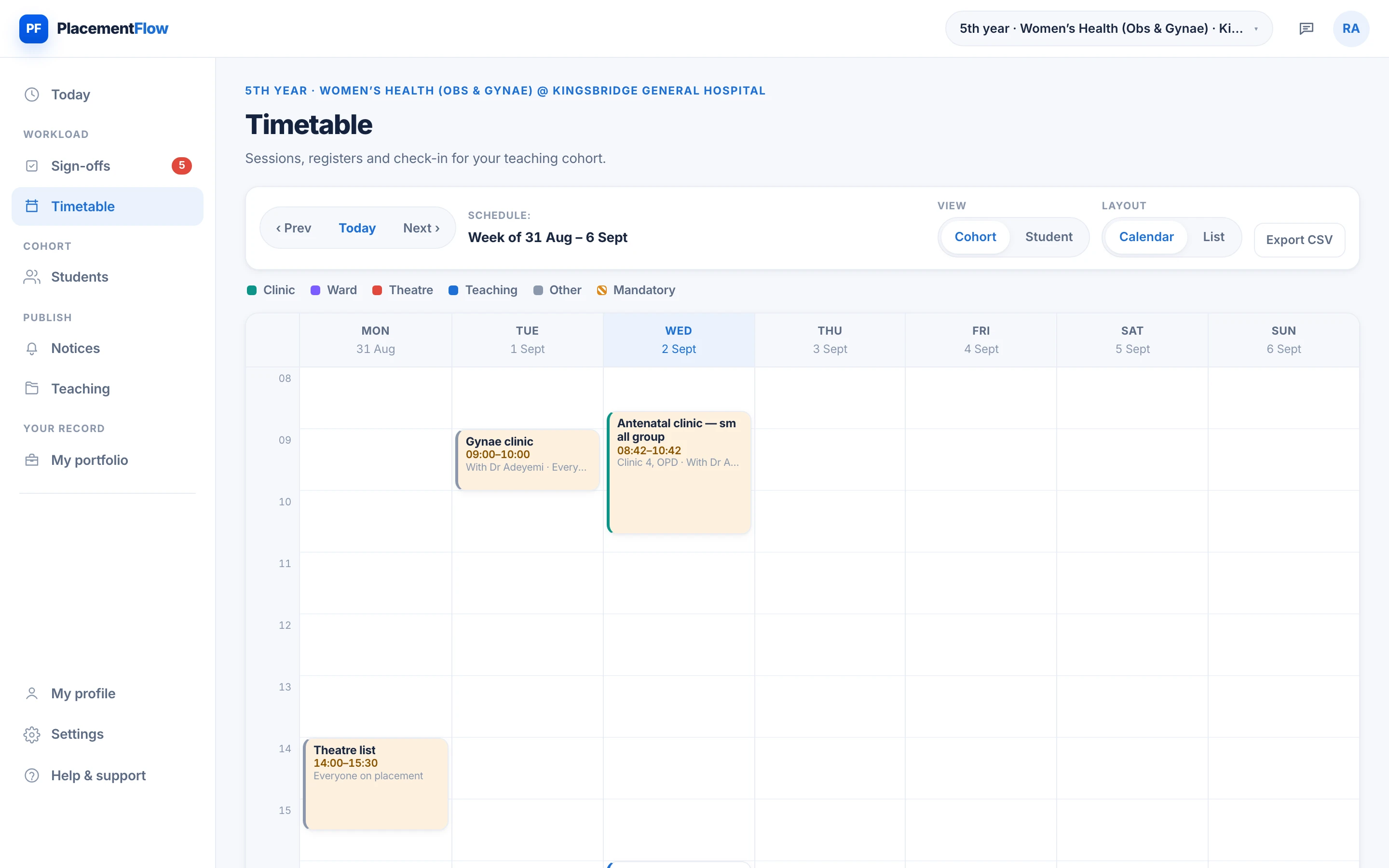
The cohort's published week: colour-coded clinic, ward, theatre and teaching sessions from Monday to Friday, mandatory sessions highlighted, with the week navigation and cohort or student views above the grid.

The same week, from the office.

  1. Publishes the week. Sessions, rooms and check-in windows — every student sees the same, current version.
  2. Sees coverage without chasing. Attendance recorded at source across sites; nothing to reconstruct from email.
  3. One notice to the affected cohort. A theatre list moves; the message reaches exactly who it should, and nobody else.
  4. The block's record is complete. Attendance, sign-offs and feedback, timestamped and attributable — before anyone asks.

Student record

One record. Three ways in.

All three views read and update the same record — entered once, true everywhere, timestamped and attributable. One signature at 10:24 looks like this from each side.

10:24 · Student The signed Mini-CEX arrives.

Domain ratings and the written feedback land in their record the moment the assessor signs. Nothing to upload, nothing to chase.

10:24 · Clinician Rates, writes, signs.

The write-up was attached to the request. Each domain rated, what to work on written down, signed — and it leaves the review queue.

10:24 · Placement team Coverage updates itself.

The cohort's sign-off progress moves on its own. No email, no spreadsheet, and the signature records who and when.

The student placement record

Who sees what

Each role sees its slice of the placement, and nothing more.

Roles and access are assigned by the school, not chosen by users. Students see their own record, clinicians see their cohort, and placement teams see coverage — not content they don't need.

Capability Student Clinician Placement team
Timetable Their own week, colour-coded, with the site information for the block. The cohort's week and today's sessions, with check-in windows set per session. Published once; a change reaches every student it affects.
Attendance Scans the rotating QR from their phone; sees their own check-ins. The live register for their sessions — present, excused or absent with one tap. Attendance coverage across the cohort, recorded at source.
Sign-offs Requests Mini-CEX, DOPS and case discussions; receives ratings and written feedback. The review queue: rate each domain, write feedback, sign — or return with a note. Sign-off progress for every student — who is complete, who is stuck.
Notices The notices for their block; pinned ones stay at the top of their feed. Publishes to their cohort — urgent, reminder or notice. Publishes once to the affected cohort; drafts and scheduling built in.
Placement record Their own record, timestamped. Never another student's. Their named students first, then the cohort; every signature records who and when. Coverage, not content they don't need: attendance, timetable changes, sign-off progress.

Three days, one system — configured for yours.

Tell us how your school runs placements today, and we'll explore a pilot configured around your curriculum, sites and assessment rules.

Every request is reviewed by a person.